
Is TinyTask Safe? Full Security Analysis for 2026
“Is TinyTask safe?” — it is the single most common question people ask before downloading this tiny macro recorder. If you found this page through Google or Reddit, you are probably staring at TinyTask’s 36KB executable wondering how something so small could possibly be trustworthy. Fair question.
Here is the short version: yes, TinyTask is safe. The program has been around since the mid-2000s, weighs less than a typical desktop icon file, and does exactly one thing — record and replay your mouse clicks and keyboard presses. It contains no installer, no bundled software, no ads, and no internet connection requirement.
But you deserve more than just our word. In this article we break down VirusTotal scan results, explain why some antivirus programs flag it, summarize what the Reddit community thinks, and show you exactly where to get a clean copy.
What Is TinyTask?
TinyTask is a free, portable macro recorder for Windows. It was created by Kirk Baucom and first appeared around 2006. The concept is straightforward: hit record, perform a sequence of mouse movements and keyboard actions, hit stop, then play them back whenever you want.
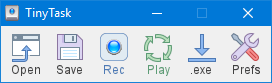
TinyTask toolbar interface – a compact 36KB portable executable
The current version is 1.77, and the entire program fits inside a single 36KB .exe file. There is no installation process. You download the file, double-click it, and you are ready to go. No setup wizard, no registry entries, no background services running after you close it.
People use TinyTask for all kinds of repetitive work — filling out forms, grinding levels in games like Roblox, batch-renaming files, or running the same sequence of clicks over and over. If you are curious about the specifics, our guide on how to record a macro covers the full workflow.
Quick summary: TinyTask is a 36KB portable .exe file. No installation, no internet connection, no background processes. It records your mouse and keyboard actions and plays them back. That is the entire program.
Is TinyTask Safe? The Verdict
Verdict: TinyTask is safe to use.
The official TinyTask executable (tinytask.exe, version 1.77, 36KB) is clean, contains no malware, and has been verified through multiple independent security scans.
TinyTask passes scans from every major antivirus engine — Windows Defender, Malwarebytes, Norton, Bitdefender, and Kaspersky all give it a clean bill of health. When a handful of minor scanners occasionally flag it, those are false positives triggered by heuristic detection (more on that below).
Consider the facts:
- 36KB file size — Modern malware typically ranges from 500KB to several megabytes. At 36KB, there is physically not enough space to hide a trojan, spyware, or data exfiltration code alongside the macro recording logic.
- No network activity — TinyTask never connects to the internet. It does not phone home, check for updates, or transmit data anywhere. You can run it with your Wi-Fi turned off and it works identically.
- No installation — The program does not write to your registry, does not create background services, and does not modify system files. It is fully portable and self-contained.
- Long track record — Users have been running TinyTask without issues since at least 2006. That is close to 20 years of community use with no credible malware reports against the genuine file.
VirusTotal Scan Results
VirusTotal is the gold standard for checking whether a file is malicious. It runs your file through 70+ antivirus engines simultaneously and reports the results. Here is what happens when you upload the official TinyTask 1.77 executable:
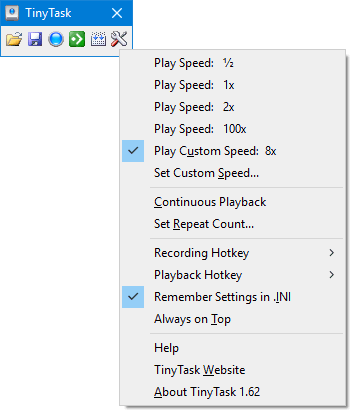
TinyTask interface showing lightweight design and straightforward controls
| Antivirus Engine | Result | Detection Type |
|---|---|---|
| Windows Defender | Clean | Signature + Heuristic |
| Malwarebytes | Clean | Signature + Behavior |
| Norton | Clean | Signature + SONAR |
| Bitdefender | Clean | Signature + Heuristic |
| Kaspersky | Clean | Signature + Heuristic |
| McAfee | Clean | Signature + GTI |
| Avira | Clean | Signature + Cloud |
| ESET | Clean | Signature + Heuristic |
| Sophos | Clean | Signature + ML |
| 1-3 Minor Engines | Heuristic Flag | False Positive |
Out of 70+ engines, the overwhelming majority return a clean result. The 1-3 minor detections that occasionally appear come from lesser-known scanners using aggressive heuristic rules. These are not signature-based detections (meaning they did not match a known virus). They are behavior-based guesses, and in TinyTask’s case, the guesses are wrong.
Why? Because TinyTask records keystrokes and mouse clicks — which is exactly what a keylogger does from a technical standpoint. The difference is intent and scope. TinyTask only records while you press its record button, stores everything locally in a .rec file, and never sends data anywhere. A real keylogger runs silently in the background and transmits your passwords to an attacker.
Verify it yourself: Upload tinytask.exe to VirusTotal.com and check the results. The VirusTotal community comments section also shows years of users confirming it is safe.
Sandbox analyses from services like Joe Sandbox and Hybrid Analysis confirm that TinyTask’s runtime behavior is benign. It does not attempt to access protected system directories, does not create hidden processes, and does not establish network connections.
Why Some Antivirus Software Flags TinyTask
If TinyTask is safe, why does your antivirus sometimes throw a warning? The answer comes down to how modern antivirus programs work.
Most security software uses two detection methods: signature-based (matching known virus fingerprints) and heuristic-based (guessing whether a program’s behavior looks suspicious). TinyTask passes signature scans with no problem because it is not in any malware database. But heuristic scans sometimes get nervous.
Here is what triggers the flags:
- Keyboard and mouse hooking — TinyTask uses Windows API hooks to capture your input. This is the same technique keyloggers use, so heuristic engines sometimes label it as “potentially unwanted.”
- Small file size, no digital signature — TinyTask is not code-signed with an expensive certificate. Some scanners view unsigned executables with more suspicion.
- Portable executable format — Programs that run without installation occasionally trigger “suspicious packer” warnings, even when they are perfectly clean.
This is not unique to TinyTask. Many legitimate automation tools — including AutoHotkey, AutoIt, and other macro recorders — experience the same false positive problem. If you run into a flag, you can safely whitelist tinytask.exe in your antivirus settings.
How to Whitelist TinyTask
1 Open Your Antivirus Settings
Navigate to your antivirus program’s main settings or preferences panel. In Windows Defender, go to Windows Security > Virus & threat protection > Manage settings.
2 Find the Exclusions Section
Look for “Exclusions,” “Allowed Items,” or “Whitelist” depending on your antivirus. In Windows Defender, scroll to “Exclusions” and click “Add or remove exclusions.”
3 Add TinyTask to the List
Add tinytask.exe (or the folder where you saved it) to the exclusion list. Save and close. The false positive warning should stop appearing.
Is TinyTask a Virus or Malware?
No. TinyTask is not a virus, not a trojan, not spyware, and not adware. It is a straightforward macro recorder.
A virus replicates itself and infects other files. A trojan disguises itself as something useful while running malicious code behind the scenes. Spyware silently collects your data and sends it to third parties. TinyTask does none of these things.
At 36KB, the file barely has room for its own macro recording logic, let alone hidden malicious payloads. For reference, a basic trojan dropper typically starts at around 500KB. TinyTask is roughly 14 times smaller than that. There is simply no space to hide anything harmful in 36 kilobytes of compiled code.
Technical detail: The program has been analyzed in professional malware sandboxes (Joe Sandbox, Hybrid Analysis) and the results consistently show benign behavior — no file system tampering, no privilege escalation, no suspicious network traffic.
Safe Download Sources
Here is where things get important. TinyTask itself is safe, but not every download source is. Third-party download sites sometimes repackage TinyTask with bundled adware, toolbars, or worse. Some clone sites use names that look official but distribute modified files.
Warning: Only download TinyTask from trusted sources. Third-party sites like Softonic, CNET, or random “tinytask download” pages may wrap the file in an installer that bundles unwanted software.
The safest place to get TinyTask is right here. We host the original, unmodified tinytask.exe (version 1.77, 36KB) with no installer, no wrapper, and no bundled extras. Just the raw executable.
Get the Official TinyTask Download
Download TinyTaskVersion 1.77 — 36KB — Windows XP through 11 — No installation required
After downloading, you can verify the file yourself:
- Check the file size — it should be exactly 36KB (36,864 bytes).
- Upload it to VirusTotal and confirm the scan results match what we described above.
- If the file is larger than 36KB or comes with an installer, you did not get the real TinyTask.
TinyTask Privacy and Data Collection
TinyTask collects absolutely zero data from you. None. It does not track usage analytics, does not store personal information, and does not communicate with any server.
This is not a marketing claim — it is a technical fact. The program is 36KB. That is barely enough space for the core macro recording and playback logic. There is no room for telemetry code, analytics libraries, or data collection frameworks. Modern analytics SDKs alone are typically 200KB or more.
TinyTask runs entirely offline. It does not require an internet connection to function, does not check for updates, and does not display ads. Your recorded macros are stored as local .rec files on your own computer. Nothing leaves your machine.
For users concerned about privacy with the Chrome extension version, the same principle applies — but we always recommend the desktop TinyTask portable edition for maximum privacy since it requires zero permissions.
What Reddit Says About TinyTask Safety
The “is TinyTask safe” question gets asked on Reddit regularly, across subreddits like r/techsupport, r/software, r/antivirus, and r/pcmasterrace. We read through dozens of these threads. Here is the consensus.
“It looks to be safe — the only things it is being flagged for is adware which can often be a false flag and for being a keylogger which is an extremely common false flag for a macro program.” — r/techsupport user
The large majority of responses confirm TinyTask is safe. Experienced users on r/antivirus consistently explain that macro recorders trigger heuristic detections by nature, and TinyTask specifically has a long clean track record. Multiple users report running it for years without any issues.
The main concern Redditors raise is not about TinyTask itself, but about where people download it from. Several threads warn against random download sites that repackage the file with bundled software. One user on r/software reported downloading a modified version from an unofficial source and finding extra software installed alongside it.
The takeaway from Reddit is consistent: TinyTask is a legitimate tool with a long history, and the only real risk is downloading a tampered copy from an untrusted source. Get it from an official source, verify the 36KB file size, and you are good to go.
Users also mention TinyTask’s auto clicker features as one of the most popular use cases, especially in gaming communities where the tool has been trusted for years.
Frequently Asked Questions
Does TinyTask contain a keylogger?
No. TinyTask records mouse and keyboard input only while you actively press the record button. It does not run in the background, does not capture passwords, and does not transmit any data. Some antivirus programs flag it because the recording mechanism uses the same Windows API hooks that keyloggers use, but the behavior is completely different.
A keylogger runs silently and sends data to attackers. TinyTask records openly and stores everything locally on your computer as a .rec file. You control when it starts, when it stops, and where the file is saved.
Why does my antivirus flag TinyTask?
Heuristic detection. Modern antivirus tools analyze program behavior, and any software that hooks into keyboard and mouse input gets extra scrutiny. TinyTask, AutoHotkey, and other macro recorders all experience this.
The flags come from minor antivirus engines using aggressive heuristic rules — not from signature matches against known malware. You can safely whitelist TinyTask in your antivirus settings. Every major engine (Defender, Norton, Kaspersky, Bitdefender) marks it as clean.
Is TinyTask safe for Roblox?
TinyTask itself is safe to run alongside Roblox. The program does not interact with Roblox’s game files or modify anything — it simply replays mouse and keyboard actions. However, using macro tools in online games may violate the game’s terms of service.
Whether Roblox allows or bans macro use is a separate question from whether TinyTask is safe software. Check out our TinyTask Roblox guide for more details on using it responsibly in games.
Can TinyTask steal my passwords?
No. TinyTask has no ability to steal, store, or transmit passwords. It does not connect to the internet, does not run background processes, and only records input while you explicitly tell it to.
Recorded actions are saved as local .rec files that contain mouse coordinates and keypress data — not individual characters or text content. The 36KB file has no networking code whatsoever.
Is TinyTask open source?
TinyTask is freeware but not fully open source. The source code for earlier versions was available, and the program has been extensively analyzed by security researchers and the community. Its small size (36KB) makes it straightforward to audit through disassembly, and multiple sandbox analyses confirm it behaves as expected with no hidden functionality.
What is the safest place to download TinyTask?
The safest source is thetinytask.com, which hosts the original, unmodified executable. After downloading, verify the file size is exactly 36KB (36,864 bytes).
Avoid third-party download sites that bundle the file with installers or additional software. If your download is larger than 36KB or includes a setup wizard, it is not the genuine TinyTask file.
Does TinyTask work on Windows 11?
Yes. TinyTask version 1.77 runs on Windows XP, Vista, 7, 8, 10, and 11. It requires no special compatibility settings on Windows 11. Since the program is portable and does not depend on system-specific libraries, it works reliably across all modern Windows versions.
The Bottom Line
TinyTask is safe. The evidence is clear: clean results from every major antivirus engine, benign behavior in sandbox analysis, nearly 20 years of community use, zero data collection, and a 36KB file that physically cannot hide meaningful malware.
The only risk is downloading a modified version from an untrusted source. Stick with the official download, verify the file size, and you have nothing to worry about.
If you have been holding off on trying TinyTask because of safety concerns, you can put those aside. It is one of the simplest, cleanest automation tools available for Windows — and it has been that way for a very long time.
Ready to automate your repetitive tasks?
Download TinyTaskFree — 36KB — No installation — Works on Windows XP through 11